
Get 3x more interviews by reaching recruiters directly.
InTouch captures contacts from LinkedIn, finds verified emails, and drafts personalized messages with AI — so you get seen, not buried.
Works where you job hunt



The 2026 reality
Only applying isn't enough in the 2026 job market.
You hit Apply
Now what?
Instead of waiting in the queue, the people who land interviews reach out directly.
How to do it
3 emailing strategies that get you more interviews.
Each targets a different contact. Pick the one that fits the company, the role, and how warm a path you can build.
Company recruiter
The closest path to a formal screen when you fit a live posting. Recruiters are under pressure to fill roles fast, so a concise, role-specific note gets noticed.
Hiring manager
The owner of the unfilled seat. They care about real team fit over ATS keywords — ideal when your value is hard to capture in resume bullets.
Peer on the team
A warm bridge — start by asking for advice, not a referral. Peers are motivated to weigh in on new hires, and a shared background lowers the cost of replying.
Must read·the playbook to land interviews
How it works
Outreach, built into your job hunt.
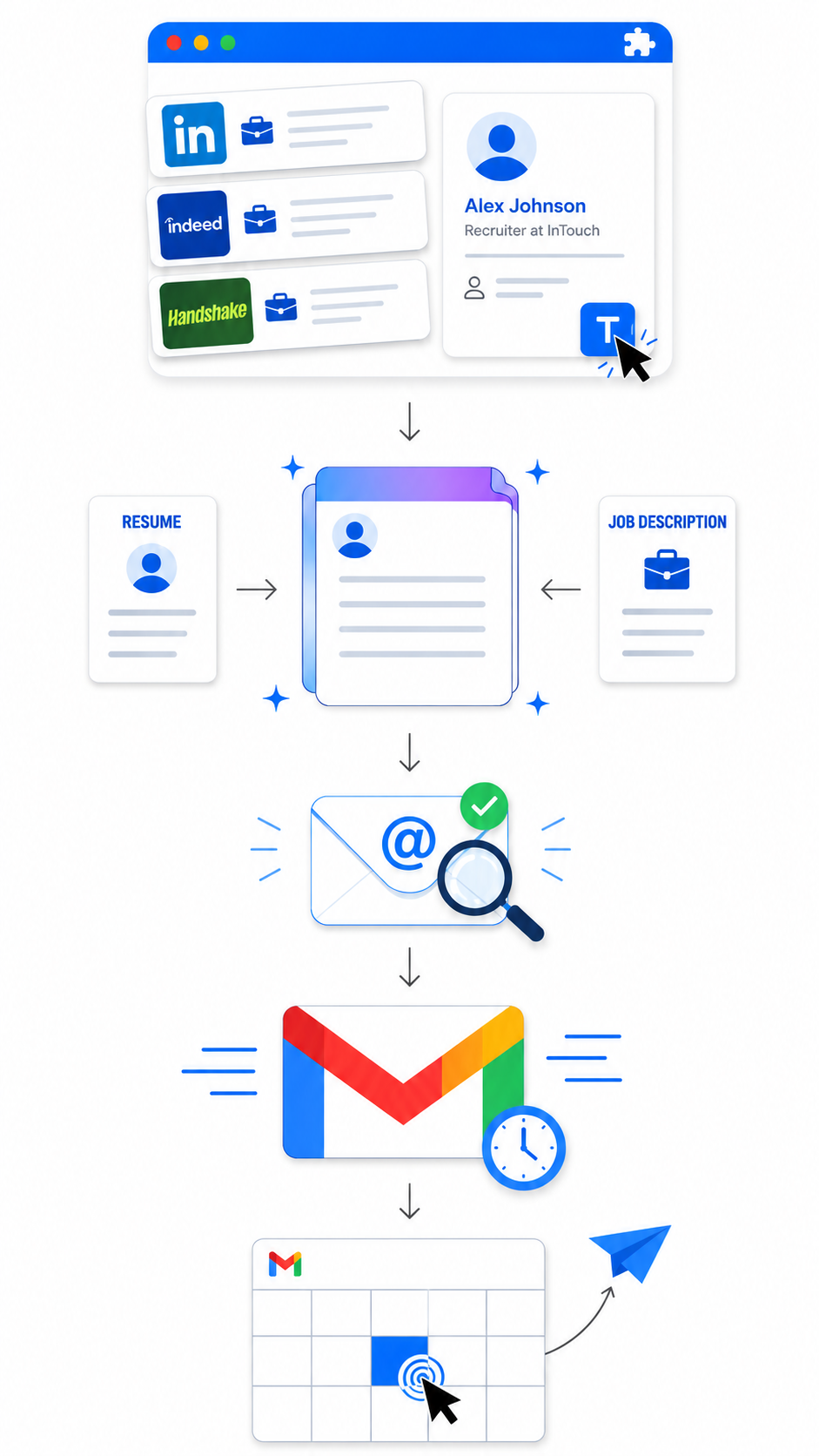
Most outreach tools sit in a separate tab. InTouch lives on the pages you're already browsing — LinkedIn, Indeed, Handshake — so reaching a recruiter is a few extra clicks, not a separate workflow.
- 1
Capture
💼 Save jobs straight from LinkedIn, Indeed, and Handshake.
📧 On any LinkedIn profile, save the recruiter for later — or start an email right from the Chrome extension.
- 2
AI compose
Generate a draft with AI — based on your resume and the job description, or write your own prompt.
- 3
Email finder
Runs automatically when you hit send — verified recruiter email, no extra step.
- 4
Send
Send through your Gmail — now or scheduled. Works from the Chrome extension or the dashboard.
- 5
Follow up
Send a follow-up in one click. Duplicate detection blocks you from emailing the same recruiter for a different role.
Built for outreach
Everything you need to get replies.
1-Click Capture
Save jobs, recruiters, and every detail you need — straight from LinkedIn, Indeed, and Handshake.
Learn moreEmail Finder
Verified recruiter emails with industry-leading accuracy. Messages land in inboxes — not bounce folders.
Learn moreAI Compose
Personalized using your resume, the JD, and any file you upload — or write your own prompt.
Learn moreSchedule Send
Land at the top of the recruiter's morning inbox — when they actually have time to read.
Application & Outreach Dashboard
Saved jobs, contacts, sent emails, and follow-ups — every part of your search in one centralized home.
Learn moreFrom the founder
Why I built InTouch
I built InTouch because applying to 100 jobs and hearing nothing back felt like the system was broken. Cold outreach worked — when I had time to find the email, write the message, and track the follow-up. But that grind was its own job.
So I built the tool I wished I'd had. Capture the recruiter and the role in one click. Let AI write the personalized message using the actual job description and your resume. Send from LinkedIn, schedule for later, follow up before it slips. No spreadsheet. No LinkedIn Premium.
It's the version of recruiter outreach I wish I'd had during my own job search. I hope it shortens yours.
Kai Jiang
Founder of InTouch
From our beta
Outreach gets replies. Here's the proof.
In our beta, job seekers who reached out directly turned cold applications into real conversations — fast.
2,000+
emails sent
150+
recruiter replies
50+
interviews landed
🚀 InTouch just launched — get in while direct outreach still surprises recruiters.
Pricing
Start free, scale when you're ready
$60 billed annually
- 25 email search credits
- Write your own outreach emails
- 50 follow-up automations
- Unlimited job applications & contacts
$144 billed annually
- 80 email search credits
- 150 AI email generations
- Unlimited follow-up automation
$300 billed annually
- 200 email search credits
- 400 AI email generations
- Everything in Pro
- 2 email search credits
- Up to 10 job applications
- Up to 10 saved contacts
- 5 scheduled follow-ups
- Basic email templates
FAQ
Have a question?
No. InTouch sends emails through your Gmail — not LinkedIn. The Chrome extension only reads what you can already see on a profile (recruiter name, title, company). It does not message anyone via LinkedIn or take any LinkedIn-side action.
Email-finding accuracy depends on which LinkedIn profile you start from. Pick a profile closely tied to the role and the hiring team — recruiters or hiring managers at the target company — for the best hit rate. See https://www.intouchcopilot.com/how-to-find-a-recruiter-email for examples.
Yes. Every AI draft is editable before you send. You can also save your own templates in the dashboard with variables like ${firstName}, ${company}, and ${jobPosition}, then re-use them across the extension and dashboard.
Yes — international students and early-career candidates are a primary user group. The whole point of InTouch is reaching recruiters directly when you cannot rely on referrals or already being in a hiring pipeline. Mention sponsorship requirements in your saved resume so AI drafts know to address them.
Yes. The dashboard has an Email Compose page where you can add contacts manually, draft with AI, and send — no extension required. The extension just makes capture and one-click sending faster.
Gmail only, currently. We connect via Google OAuth and send through your Gmail account. Support for additional providers is on the roadmap.
Your account stays in read-only mode after cancellation — you keep access to your contacts, jobs, and outreach history. New sends and AI generations stop until you reactivate.
Send your first recruiter email in five minutes.
Try free — the first 3 personalized emails are on us, with capture, AI drafting, email finding, and Gmail send on every plan.